


DigiNode Tools v0.10.3: Tor support, onion addresses in DigiNode Dashboard and more
Your DigiByte nodes can now run over the Tor network for better privacy. Switch your mainnet node, your testnet node or both to Tor from the DigiNode Setup main menu, and DigiNode Dashboard shows their onion addresses. Two commands have easier names too, and there are several fixes.
New to DigiNode Tools? See what it does →
Tor support New
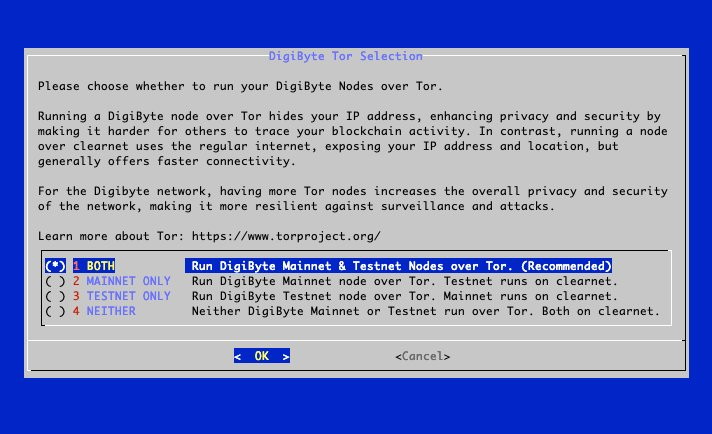
Your DigiByte nodes can now run over the Tor network. Running a node over Tor hides your IP address, which makes it harder for others to trace your blockchain activity, and more Tor nodes make the DigiByte network more private and resilient as a whole. A node over clearnet (the regular internet) generally connects faster.
Making Tor work for DigiNode took weeks of hard work, with plenty of late nights puzzling over how to make it happen. It’s been the biggest challenge of any DigiNode Tools update so far, and I’m really proud of it.
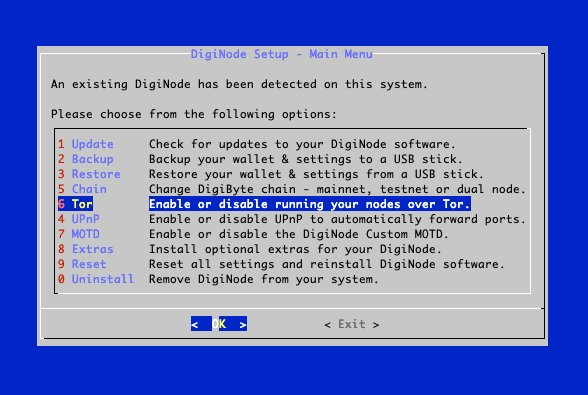
Choose Tor from the DigiNode Setup main menu, then choose which of your nodes should run over Tor: both, mainnet only, testnet only or neither. DigiNode Tools sets up Tor for you and restarts your nodes. DigiNode Dashboard then shows each node’s onion address, and diginode --dgbpeers and diginode --dgb2peers list onion peers too.
Other improvements and fixes
- Improvement Easier to remember - The
--dgbcfgflag is now--dgbconf, and--dgntsetis now--settings. - Fix Tor set up properly - DigiNode Tools is better at checking that the Tor service is set up and running, and your user account is now added to the ‘debian-tor’ group so the Tor control port works. Your nodes are now restarted when their Tor settings change, and a bug when adding the Tor settings to digibyte.conf is fixed.
- Fix Dual Node on a new system - The mainnet and testnet nodes now start when you install a Dual Node on a fresh system.
- Fix Testnet-only DigiNodes - DigiNode Dashboard no longer shows an error when you run only a testnet node.
- Fix DigiNode Dashboard - Fixed an error loading the CPU usage when it starts, and the terminal cursor now comes back when you quit.
This post covers DigiNode Tools v0.10.0, v0.10.1, v0.10.2 and v0.10.3. Each release’s own notes are on GitHub.
If you run into any issues with this release, please let me know in the DigiNode Tools Telegram group or on GitHub.

Comments
Read new posts in apps such as Leaflet or Standard Reader.
RSS feedView on BlueskyView on Standard ReaderTo comment here as {{handle}}, this site needs one more permission from your Atmosphere account.
Your account's own site (Bluesky's, for most people) will ask you to approve it, and may ask you to sign in there first. Then you'll come straight back here.
Powered by Atmosphere Comments for Astro