


DigiByte Vanity Address: Make a DigiByte address with letters you choose
DigiByte Vanity Address is a new free tool that makes a DigiByte address with letters you choose, at the start, the end or anywhere in it, like dgb1qcafe… or dgb1q…seed. It runs entirely in your web browser: your private key is made on your own device and is never sent anywhere.
New to DigiNode Tools? See what it does →
What is a vanity address?
A vanity address is a normal DigiByte address that happens to contain letters you chose. It works exactly like any other address: you can receive DGB to it, and spend from it with any wallet that can import its private key. It’s a nice touch for a business, a project, a donation address, or just for fun.
There’s no shortcut to making one. The tool makes random keys, very fast, and checks each address until one has your letters in it. Each extra letter makes a match 32 times rarer, so short words are quick and long ones take a while.
How it works
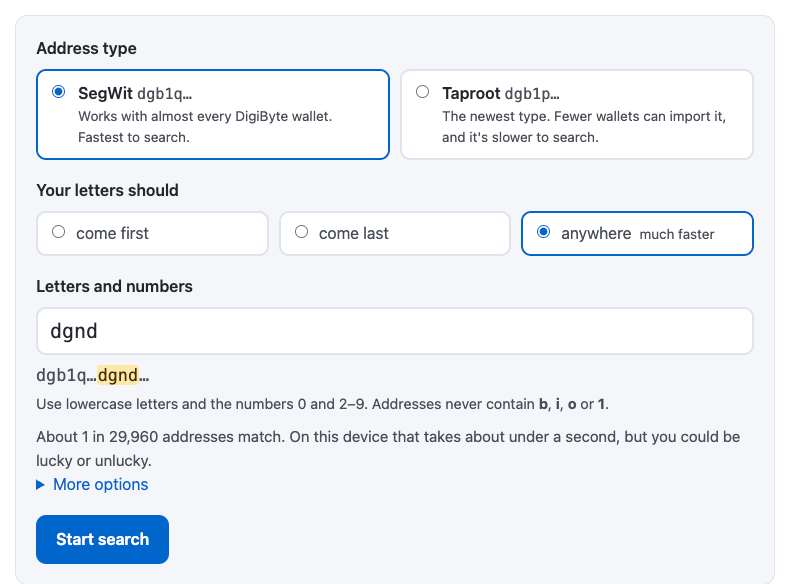
You choose the type of address, whether your letters should come first, last or anywhere, and type them in. The tool shows how long it should take on your device, and then starts searching, using every core your computer has.
On a recent laptop it checks around three million addresses a second. That means:
- 4 letters: under a second
- 5 letters: around 10–20 seconds
- 6 letters: a few minutes
- 7 letters: a few hours
That’s for letters at the start or the end. Letters anywhere is much faster: there are many more places they can appear (a 6-letter word fits in 33 places in a SegWit address), so a match turns up roughly 30–50 times sooner, and even 7 or 8 letters only take minutes.
When it finds a match, it shows your new address and its private key, with QR codes for both and the exact command to import the key into DigiByte Core. The address can’t be copied until you’ve saved the private key, so you can’t accidentally start using an address you can’t spend from.
It makes two types of address:
- SegWit (
dgb1q…): works with almost every DigiByte wallet, and is the fastest to search. - Taproot (
dgb1p…): the newest type. Anyone can send to it, but fewer wallets can import a single Taproot key yet, and it’s slower to search.
Is it safe?
Your private key never leaves your device. The tool runs entirely in your browser, using your browser’s secure random number generator, and the page is locked so that it can’t send anything over the internet. On diginode.tools it runs in a separate, sandboxed frame that nothing else on the page can read.
Every address it finds is checked a second time with separate, well-known code before it’s shown. Its addresses have also been checked against DigiByte Core itself, and receiving and spending coins from both types of address has been tested in DigiByte Core.
If you’d like to be extra careful, for example for an address that will hold a lot of DGB, you can download the whole tool as a single file and run it offline, in a private window. The page explains how to be extra careful.
Its code is public on GitHub, and every release is built by GitHub from that code, so anyone can check that the tool they’re using is the one in the code.
Try it
Make yours on the DigiByte Vanity Address page. As with any new address, send a small amount first and check you can spend it.
If you have questions, ask in the DigiNode Tools Telegram group.

Comments
Subscribe to read new blog posts in apps that support Standard.site, such as Standard Reader or Leaflet.
To see everything @diginode.tools posts, follow on Bluesky.
To comment here as {{handle}}, this site needs one more permission from your Atmosphere account.
Your account's own site (Bluesky's, for most people) will ask you to approve it, and may ask you to sign in there first. Then you'll come straight back here.
Powered by Atmosphere Comments for Astro