


DigiNode Tools v26.10.04: Hourly update checks, safer shutdowns and more
This update makes keeping your DigiNode up to date calmer and safer. You can now tell DigiNode Dashboard to stop asking about a DigiByte Core update, DigiNode Tools checks for its own updates every hour, and DigiByte Core gets more time to shut down safely. There are several fixes too.
New to DigiNode Tools? See what it does →
Option to ignore reminders to update DigiByte Core New
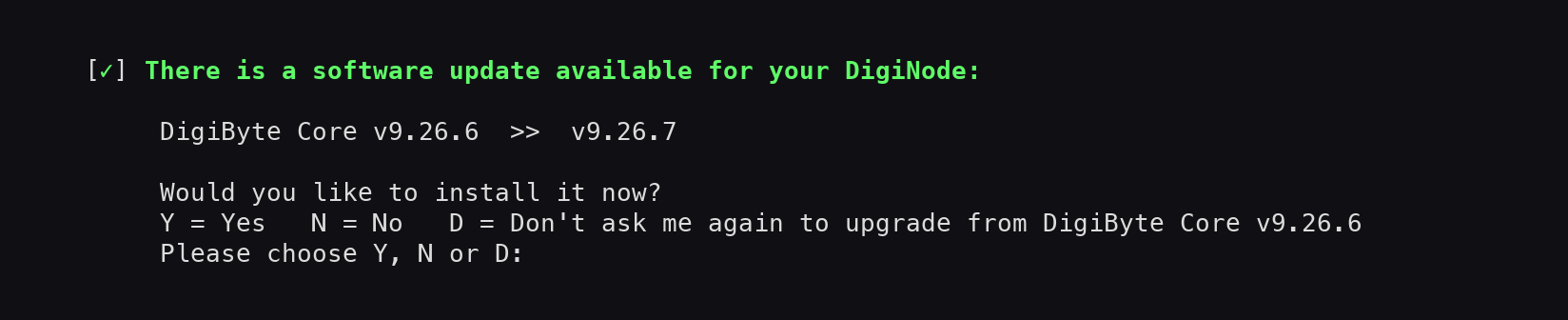
When you quit DigiNode Dashboard and a DigiByte Core update is available, you can now choose “Don’t ask me again”. DigiNode Dashboard then stops asking you to upgrade from the version of DigiByte Core you have installed, until you next upgrade or downgrade it. It still shows that an update is available, and you can upgrade at any time by running ‘diginode-setup’ and choosing Update. Updates to DigiNode Tools are still offered.
Other improvements and fixes
- Improvement Hourly update checks - DigiNode Dashboard now checks for new versions of DigiNode Tools once an hour (previously once a day), so fixes reach you sooner, for example while you watch your node sync.
- Improvement Quicker update checks - DigiNode Setup no longer waits for DigiByte Core to finish starting up before checking for updates, which could take 10 minutes or more. It now reads the installed version from the DigiByte Core install folder, which also gives the exact version of pre-releases.
- Improvement Fewer update checks - DigiNode Dashboard no longer checks for Kubo (IPFS) updates when Kubo isn’t installed. This cuts an unneeded daily request to GitHub, which limits how often each internet connection can check for updates.
- Fix Safer shutdowns - DigiByte Core is now given up to 10 minutes to shut down safely (previously 60 seconds). A node that is busy syncing, especially on a Raspberry Pi, could take longer than that to save its database, and was then force-stopped, which risks corrupting the blockchain data. Existing DigiNodes are updated automatically.
- Fix Always the latest release - DigiNode Setup could install the main branch of DigiNode Tools (used for final testing) instead of the latest release, when GitHub limited how often your DigiNode could check for updates. It now finds the latest release in a way that isn’t limited, and if it still can’t, it keeps your current version rather than installing anything else.
- Fix The right version on screen - DigiNode Dashboard no longer sometimes shows the previous version of DigiNode Tools when it starts, for example straight after an upgrade.
- Fix No more “du: cannot access” errors - DigiNode Dashboard no longer briefly shows this error at the bottom of the screen, about once a minute, while a DigiByte node is syncing.
This post covers DigiNode Tools v26.10.02, v26.10.03 and v26.10.04. Each release’s own notes are on GitHub.
If you run into any issues with this release, please let me know in the DigiNode Tools Telegram group or on GitHub.

Comments
Read new posts in apps such as Leaflet or Standard Reader.
RSS feedView on BlueskyView on Standard ReaderTo comment here as {{handle}}, this site needs one more permission from your Atmosphere account.
Your account's own site (Bluesky's, for most people) will ask you to approve it, and may ask you to sign in there first. Then you'll come straight back here.
Powered by Atmosphere Comments for Astro