


DigiNode Tools v0.9.9: Menus fixed, verified DigiByte Core downloads, a new website and more
DigiNode Setup’s menus work again on the latest Raspberry Pi OS and Ubuntu, every DigiByte Core download is now checked against its SHA256 hash before it’s installed, and DigiNode Tools has its own website at last. DigiFacts now come from a web service, and there are plenty of smaller improvements and fixes.
New to DigiNode Tools? See what it does →
Menus that work everywhere Fix
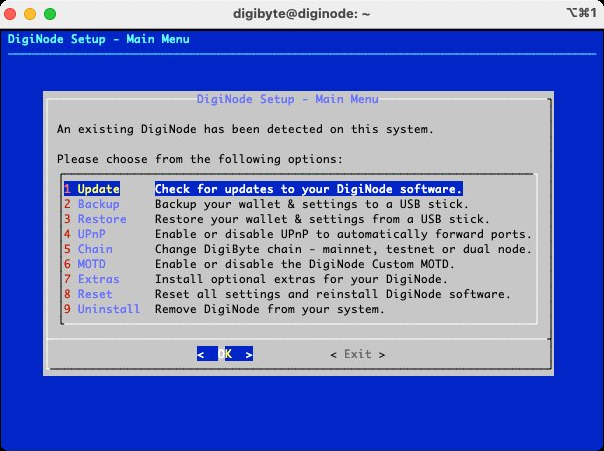
A bug in Debian made DigiNode Setup’s menus freeze when it started: key presses did nothing, so it was impossible to carry on. It affected Ubuntu, which needed a workaround, and then found its way into the latest Raspberry Pi OS. The bug only affects whiptail menus, so every menu, yes/no question and message box in DigiNode Setup, all 196 of them, now uses dialog instead. The Ubuntu workaround is no longer needed.
Verified DigiByte Core downloads New
Before installing or upgrading DigiByte Core, DigiNode Setup now looks for its SHA256 hash on the DigiNode Tools website, and only goes ahead if there is one. Once downloaded, the file is checked against the hash to make sure it hasn’t been tampered with. This makes your DigiNode much safer, and protects it even if the DigiByte Core repository were ever compromised. In an emergency you can skip the check with the --skiphash flag, but this isn’t recommended. (Since DigiNode Tools v26.10.01, new releases are checked and their hashes published automatically.)
The DigiNode Tools website New
The DigiNode Tools website is finally live at diginode.tools, and most of the documentation has moved there from GitHub.
DigiFacts from a web service New
Your DigiNode now gets its DigiFacts from the DigiByte DigiFacts web service, and updates them once an hour. Developers are welcome to use it in their own DigiByte projects, and anyone can suggest new DigiFacts or help translate them.
Clearer updates Improvement
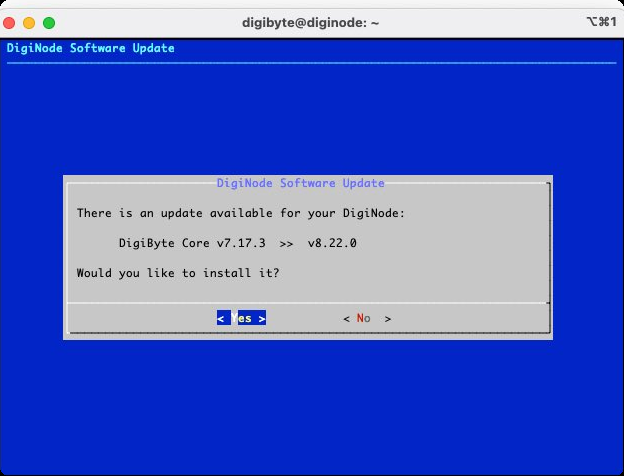
When an update is available, DigiNode Setup now shows exactly what will be upgraded, and if there are several updates, you can install them one at a time. DigiNode Tools can also install DigiByte Core v8.22.0-rc3.
No more DigiAsset Node only Change
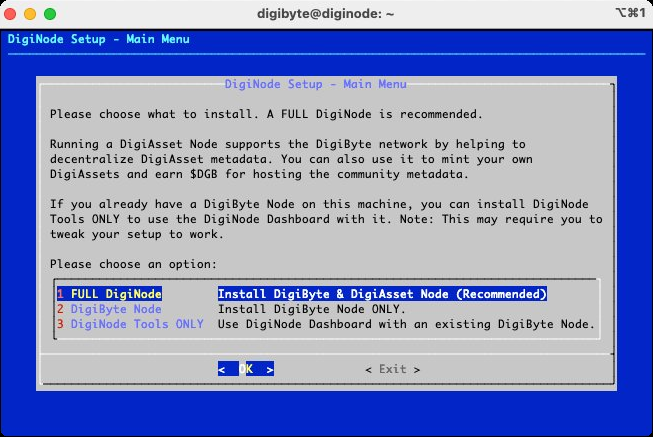
DigiNode Setup no longer offers to set up a DigiAsset Node on its own. DigiAsset Core, which will replace the current DigiAsset Node software, needs a DigiByte Node to work, so a DigiAsset Node without one won’t be possible.
Other improvements and fixes
- New Agree to the disclaimer - You now need to agree to the software disclaimer before using DigiNode Tools, and you’re asked again with each new release.
- New Testnet log - On a Dual Node,
diginode --dgb2logshows the testnet node’s log. - New Port tests on demand -
diginode --porttestswitches the DigiByte Node and DigiAsset Node port tests back on, if needed. - Improvement Times in UTC - DigiNode Dashboard now shows “System Time” and “Online Since” in UTC, wherever your DigiNode is, so it’s easier to compare nodes in different places.
- Improvement Peers in order -
diginode --dgbpeersanddiginode --dgb2peersnow list peers alphabetically. - Improvement Tidier DigiNode Dashboard - CPU usage is shown as a whole number and lines up properly, and the Web UI address is split over two lines when there are two.
- Improvement Fewer warnings - The warning about running a testnet node or Dual Node has been removed.
- Improvement IPFS Kubo - “Kubo IPFS” is now called “IPFS Kubo”, its official name.
- Fix Sync progress - DigiNode Dashboard now works out the sync progress correctly.
- Fix Servers with a public IP address - When the external and internal IP addresses are the same, DigiNode Dashboard now shows it only once, and no longer shows an error when there’s no IPv6 address.
- Fix Downgrading from a pre-release - Going back from a DigiByte Core pre-release to the latest release now works.
- Fix Smaller fixes - Password boxes work as expected, an error detecting avahi-daemon in DigiNode Dashboard is fixed, and you’re no longer asked whether to overwrite the DigiFacts file.
This post covers DigiNode Tools v0.9.4, v0.9.5, v0.9.6, v0.9.7, v0.9.8 and v0.9.9. Each release’s own notes are on GitHub.
If you run into any issues with this release, please let me know in the DigiNode Tools Telegram group or on GitHub.

Comments
Read new posts in apps such as Leaflet or Standard Reader.
RSS feedView on BlueskyView on Standard ReaderTo comment here as {{handle}}, this site needs one more permission from your Atmosphere account.
Your account's own site (Bluesky's, for most people) will ask you to approve it, and may ask you to sign in there first. Then you'll come straight back here.
Powered by Atmosphere Comments for Astro