


DigiNode Tools v0.9.3: Introducing DigiNode Dashboard, with Dual Node support
Goodbye DigiNode Status Monitor, hello DigiNode Dashboard! The Status Monitor has been redesigned and rewritten from the ground up. DigiNode Dashboard fits any terminal width, shows CPU usage and more, and on a Dual Node it shows your mainnet and testnet nodes together. It no longer flickers, and DigiFacts now come from their own repository, ready for anyone to use.
New to DigiNode Tools? See what it does →
DigiNode Dashboard New
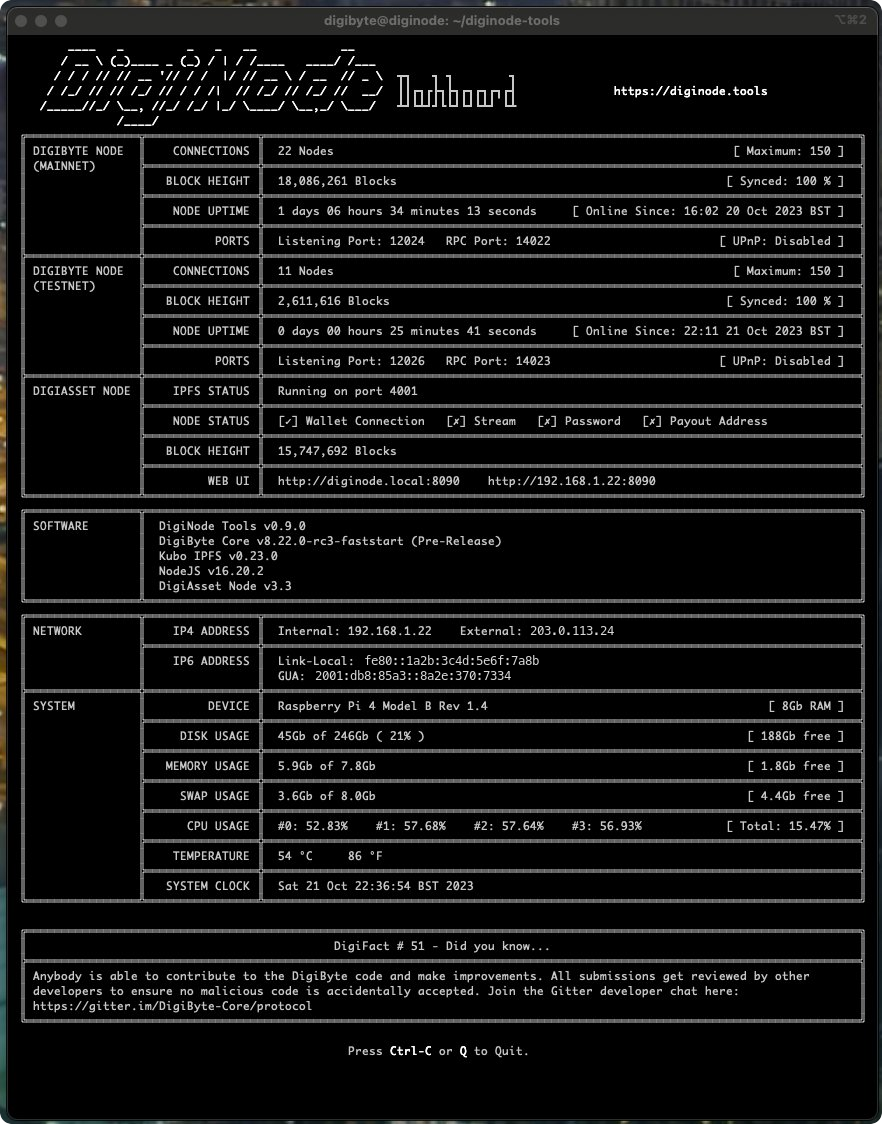
The old Status Monitor has been completely redesigned and rewritten, which called for a new name: DigiNode Dashboard. It resizes automatically to fit the width of your terminal, showing more or less detail depending on the space available, and it now shows CPU usage and other useful information.
Most importantly, it supports a Dual Node: it shows a mainnet node and a testnet node running on the same device at the same time.
Two long-standing problems are fixed too:
- No more flickering, which every earlier version was prone to.
- No more runaway scrolling: clicking in the terminal window, particularly on macOS, could make the display repeat itself down the screen, and the only way out was to scroll all the way to the bottom. It was an infuriating bug that had been there since the beginning.
On Windows, DigiNode Dashboard now shows colours. If yours doesn’t, Windows Terminal is recommended.
DigiFacts for everyone New
DigiFacts are now downloaded automatically from their own repository, as a JSON file that anyone in the DigiByte community can use in their own projects, or help improve. Today they live at digifacts.diginode.tools.
Other improvements and fixes
- New See your peers -
diginode --dgbpeersshows your DigiByte node’s current peers, anddiginode --dgb2peersthe testnet node’s on a Dual Node. - New Your RPC credentials -
diginode --rpcshows the RPC username and password for your DigiByte node. They used to be shown in the Status Monitor, but have been removed from it for privacy, and this saves looking them up in digibyte.conf. - Improvement A better update checker - The DigiByte Core update checker has been rewritten. It can now compare releases with pre-releases, including test builds such as 8.22.0-rc3-faststart.
- Fix Bugs from v0.9.0 - v0.9.1 to v0.9.3 fixed several bugs that slipped into v0.9.0, which was released in a hurry the day before I went on holiday. Lesson learned! The fixes cover the testnet disk usage, the update checker when two versions were the same, detecting your public IPv6 address, spacing when an update is available, IPFS disk usage when IPFS isn’t installed, a permissions problem with the DigiFacts file, hiding DigiFacts when they couldn’t be downloaded, and installing sysstat when it’s missing.
- Fix One name - Remaining mentions of DigiNode Status Monitor now say DigiNode Dashboard.
This post covers DigiNode Tools v0.9.0, v0.9.1, v0.9.2 and v0.9.3. Each release’s own notes are on GitHub.
If you run into any issues with this release, please let me know in the DigiNode Tools Telegram group or on GitHub.

Comments
Read new posts in apps such as Leaflet or Standard Reader.
RSS feedView on BlueskyView on Standard ReaderTo comment here as {{handle}}, this site needs one more permission from your Atmosphere account.
Your account's own site (Bluesky's, for most people) will ask you to approve it, and may ask you to sign in there first. Then you'll come straight back here.
Powered by Atmosphere Comments for Astro